
Chinese Reading Guide
Chinese stories with pinyin for beginners
Story Languages is an iPhone and iPad app with graded Chinese stories from A1 to C1, with pinyin and tone marks over every character. The stories are in Mandarin with Simplified characters. Tap any word for its meaning, listen to the story read aloud, and save words to flashcards that keep their pinyin.
Characters are the slowest part of learning Chinese, and they hold up reading for months. Pinyin over each character lets you read real sentences from your first week, hear the tones as you go, and learn the characters by seeing them in words you already understand.
Download Story Languages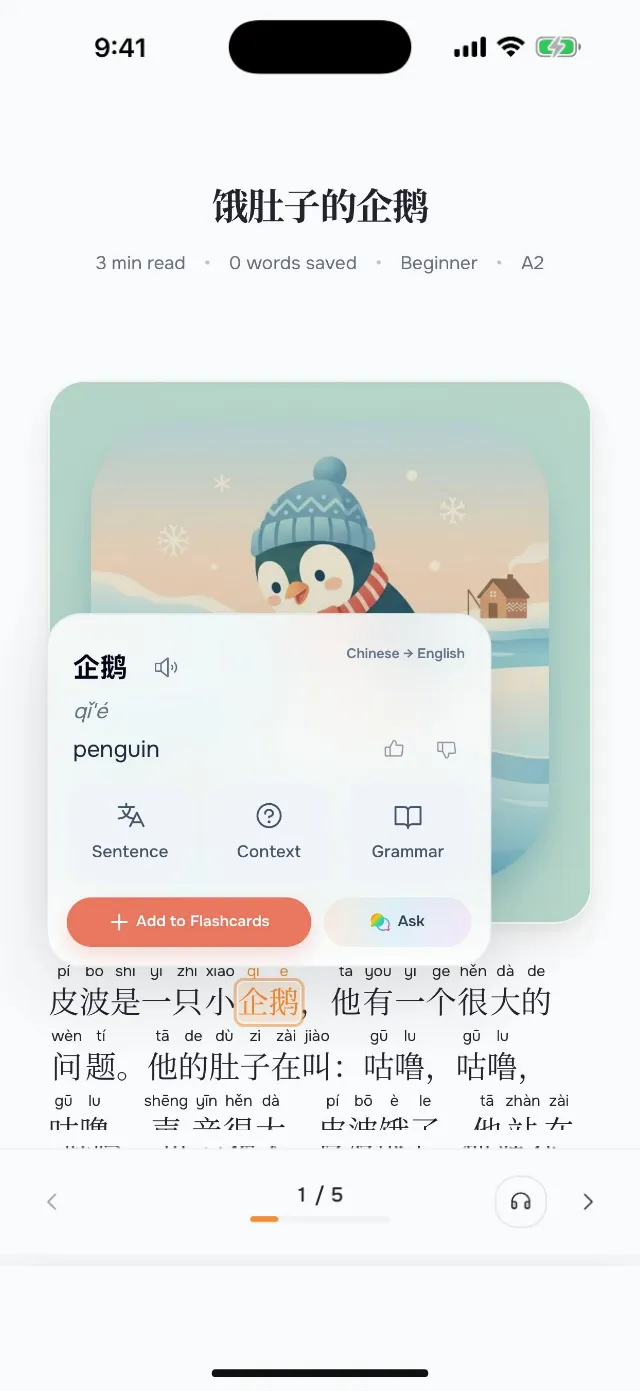
What pinyin is
Pinyin is the official way of writing Mandarin sounds in the Latin alphabet, with a mark for each tone: mā, má, mǎ, mà. Chinese children learn it before characters, and textbooks print it above new words.
Pinyin over every character, rather than only new words, means you never stall on a character you have forgotten. As the characters become familiar, you look at the pinyin less, and you can turn it off.
What to look for in Chinese reading practice
Pinyin over every character, with tone marks
A way to turn the pinyin off once you know the characters
Vocabulary graded by level, so a beginner story stays within beginner words
Audio for every story, so you hear the tones you see
Tap for meaning on a whole word, since Chinese has no spaces
Flashcards that keep the pinyin, so you review the reading as well as the meaning
How Story Languages does it
Pinyin you control
Every character carries its pinyin with tone marks. The reader shows it by default from A1 to B1; switch it to always or off in the text settings.
Graded to the HSK
Each level draws its words from the HSK 3.0 bands, from band 1 at A1 to bands 5 and 6 at C1. Structures such as 把 and 被 arrive at B1, and four-character idioms at B2.
Tap a word, keep its pinyin
A tap takes the whole word as a dictionary lists it, such as 学校 (school), with its pinyin, xuéxiào. Saved words become flashcards with the pinyin on the back.
A simple daily routine
- 1
Read one story at your level with pinyin on. If you tap more than a word every few lines, try the level below.
- 2
Turn on listen mode and follow the text while the story is read aloud, watching the tone marks.
- 3
Save five words worth keeping.
- 4
The next day, review them, then reread the story and look at the characters before the pinyin.
- 5
When a level feels easy, read the next story with pinyin off.
FAQ
Where can I read graded Chinese stories with pinyin?
In Story Languages, an app for iPhone and iPad. Its Chinese stories run from A1 to C1, pinyin with tone marks sits over every character, and the app adds tap-to-translate, audio and flashcards.
Can I turn the pinyin off?
Yes. The reader's text settings show pinyin automatically for A1 to B1, always, or never.
How are the Chinese stories graded?
By CEFR level from A1 to C1, with vocabulary from the HSK 3.0 bands: band 1 at A1 up to bands 5 and 6 at C1.
Is it simplified or traditional Chinese?
Mandarin Chinese with Simplified characters.
Do the flashcards keep the pinyin?
Yes. A word you save from a story keeps its pinyin on the back of the card.
Can I hear the stories read aloud?
Yes. Listen mode reads each story aloud sentence by sentence, and you can hold any word to hear it on its own.
Is Story Languages free?
Story Languages is free to start. Premium opens the full library of Chinese stories and removes the limits.
Related pages
Learn Chinese with stories
What makes Chinese hard to read, and how reading with the app helps.
Japanese stories with furigana for beginners
The same idea for Japanese: graded stories with the reading over every kanji word.