Learn Japanese by Reading
Learn Japanese with stories
Read graded Japanese stories with furigana over the kanji, from A1 to C1.
Learn Japanese through stories inside Story Languages. Graded stories from A1 to C1 carry furigana over every kanji word, and the kanji at each level follow the JLPT bands. Tap any phrase for a translation and its romaji, save it to flashcards, and start with the hiragana and katakana decks if the script is new.
 On the App Store as Stories - Language Learning
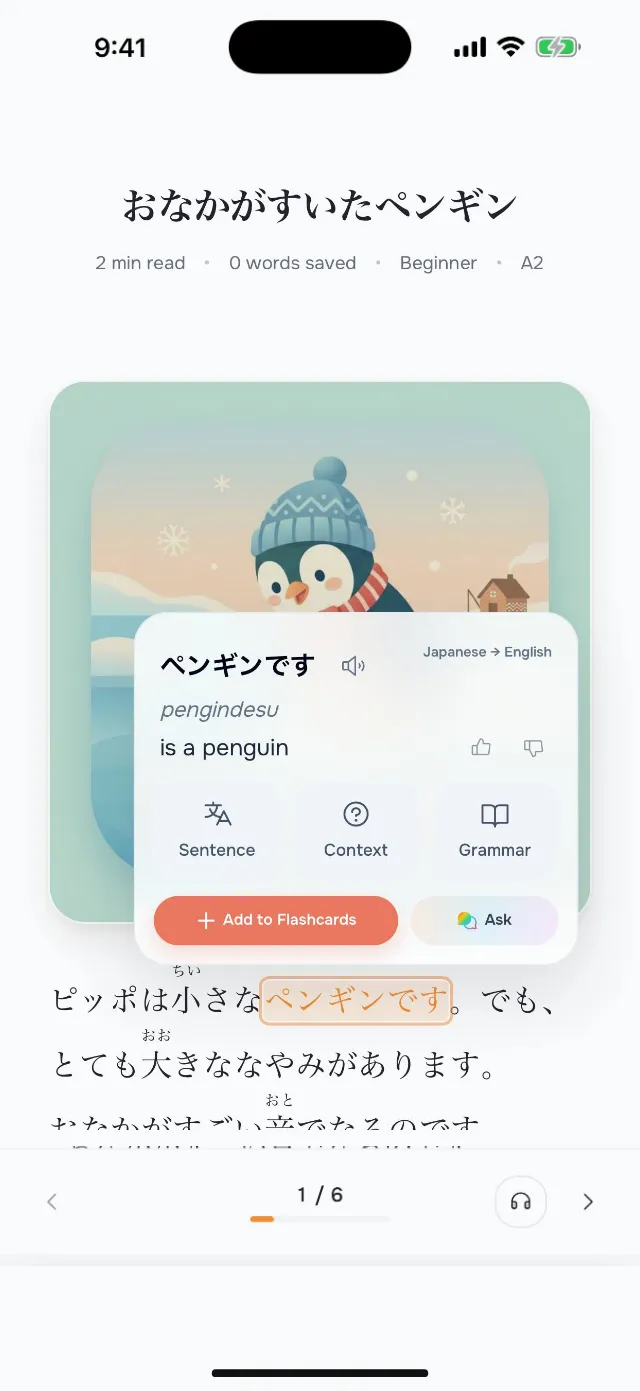
Read in context
Stories let you meet kanji inside the words and phrases that use them, with the reading right above, instead of memorizing characters one by one.
Get grammar help
Ask the AI tutor about particles like は and が, verb endings, or the difference between polite and plain speech when a sentence is unclear.
Hear the language
Listen to every story read aloud while the furigana shows how each kanji word is said.
What makes Japanese hard to read, and how stories help
Three scripts at once
Japanese mixes hiragana for grammar, katakana for borrowed words and kanji for meaning, often in one sentence. The hiragana and katakana decks teach the two kana first, so a story is readable before you know many kanji.
Furigana over the kanji
Every kanji word in our stories carries its reading in small kana above it, shown by default from A1 to B1. The kanji themselves follow the JLPT bands, from N5 at A1 to N2 at B2, and from B2 the furigana is off by default, so the reading aid fades as your level rises.
No spaces between words
Japanese runs words together, with particles and endings attached. A tap takes the phrase, such as 学校へ (to school), and shows its meaning and its romaji, gakkou e.
Polite and plain speech
Japanese changes its verb endings with the listener: 行きます to a stranger, 行く to a friend. Our A1 and A2 stories use the polite です and ます forms, and from B1 the narration switches to the plain style that books are written in.
What to look for in an app to learn Japanese with stories
Graded Japanese stories that feel readable instead of overwhelming
Tap-to-translate support for unknown Japanese words in context
Flashcards built from the vocabulary you actually save
Audio, so you hear how written Japanese sounds
Fast grammar help when a Japanese sentence or structure is unclear
Reading Workflow
- 1
Open a Japanese story at your current level.
- 2
Tap unfamiliar words instead of breaking concentration with outside lookups.
- 3
Save the useful vocabulary that appears in real sentences.
- 4
Review those words later with spaced repetition.
FAQ: learning Japanese with stories
Where can I read graded Japanese stories with furigana?
In Story Languages, an app for iPhone and iPad. Its Japanese stories run from A1 to C1, and every kanji word carries furigana, shown by default from A1 to B1.
Can I turn the furigana off?
Yes. The reader's text settings show furigana automatically for A1 to B1, always, or never, so you can test yourself on the kanji whenever you like.
Do I need to know hiragana and katakana first?
Yes, but kana is all you need. The app has a hiragana deck and a katakana deck with a short primer, and furigana covers the kanji.
Is there romaji?
Not in the text. The stories are written in Japanese script, and a tapped phrase shows its romaji in the word popover.
How should a beginner start learning Japanese with stories?
Start with the easiest stories, tap the words you don't know and save the ones worth keeping. Review those flashcards for a few minutes a day, and move up a level when the stories start to feel easy.
Can I learn Japanese for free with Story Languages?
Story Languages is free to start. Premium opens every Japanese story and removes the limits.
Explore other languages
Start learning Japanese with stories
Read, save words, review them later, and keep moving through stories that make Japanese feel usable instead of abstract.